The Complete Guide to Product Feed Management for Shopify
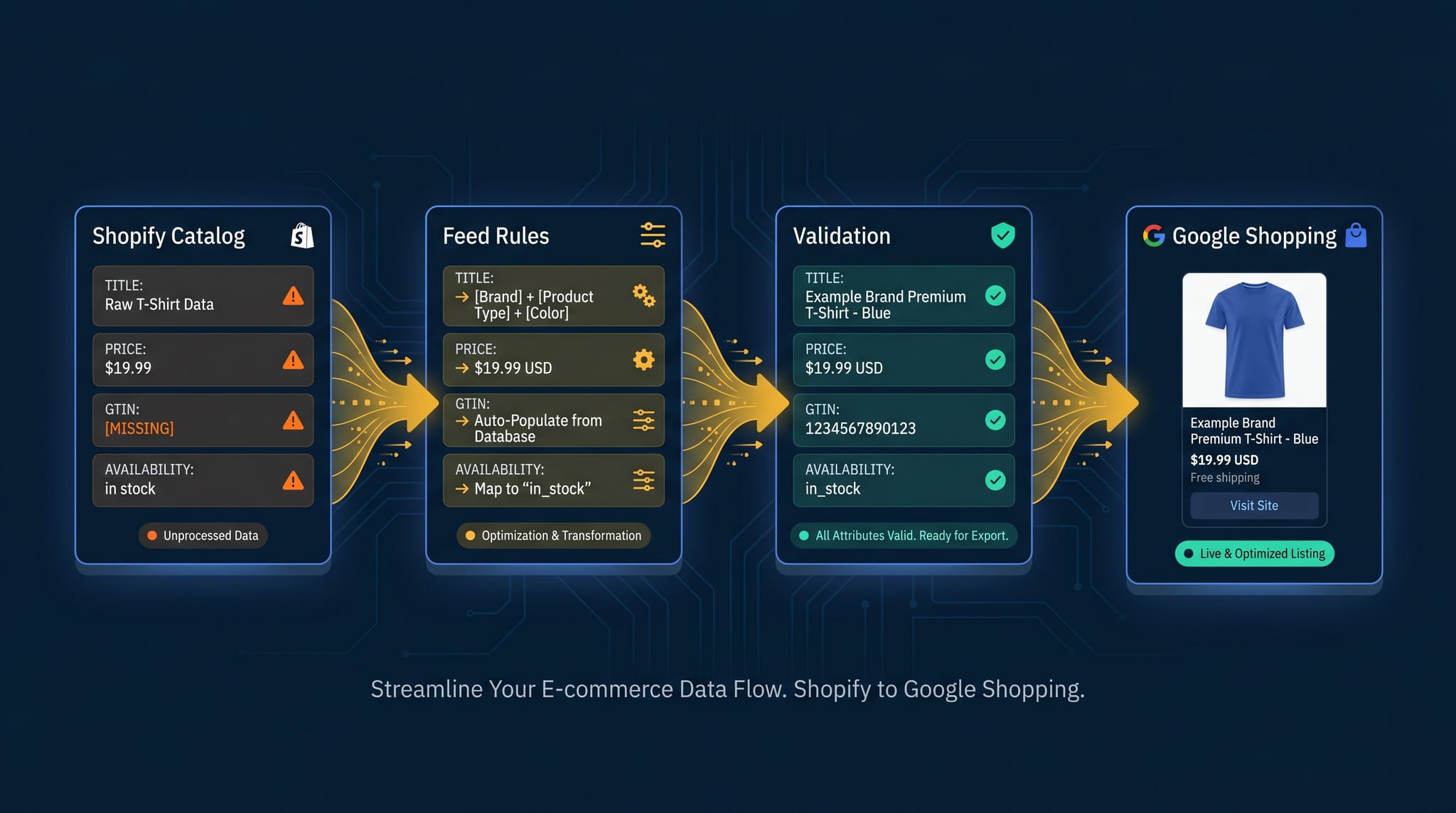
Here’s a scenario that plays out more often than it should: a Shopify merchant running Google Shopping campaigns for over a year. Products are synced to Merchant Center. The ads are live. Budget is spending. But ROAS has been flat for three months — sometimes declining — with no obvious explanation. CPCs feel high. Some products earn almost no impressions. The agency or the media buyer examines bidding strategy, audience signals, match types. Nobody looks at the feed.
That’s the gap.
Product feed management is the part of Google Shopping that most merchants never govern. The ads get attention. The bids get attention. The landing pages get attention. The feed — the structured data file that tells Google what you sell, how to categorize it, and which auctions to enter — runs in the background on whatever configuration it was given at setup. Errors accumulate. Nobody sees them until performance falls enough to prompt a review.
For a mid-sized Shopify store — say, 300 to 800 SKUs, running Shopping campaigns for a year or two — this shows up as: titles that don’t match how buyers search. Products landing in the wrong auction pools because the category mapping was set once and never revisited. Branded inventory missing GTINs and therefore not fully eligible for those auctions. Price mismatches from Shopify data changes creating silent disapprovals that nobody catches until they go looking.
The campaigns are “working.” The products are there. The ROAS is just not where it should be, and the reason isn’t visible from the campaign dashboard.
This guide is for that merchant. By the end, the feed won’t be a mystery — you’ll have a practitioner’s picture of how product feed management actually works, what breaks it, and what it costs when nobody’s governing it. If you’re looking for tactical depth, the sections on feed rules and software evaluation are where the biggest leverage is. If you’re still working out whether this matters for your catalog, start at the top.
What Is Product Feed Management (And Why It’s More Than a Sync)
A product feed is a structured data file that tells ad platforms what you sell, how to categorize it, and how to present it. Practically, it’s a tab-separated or XML file with one row per product variant, columns for required attributes like title, price, gtin, google_product_category, and dozens of optional fields that influence everything from auction eligibility to how your listing looks in search results.
The distinction that matters: your Shopify store is built for customers. Your product feed is built for algorithms. These are different audiences with different information needs, different formatting requirements, and different optimization targets. There’s no reason the same data should serve both equally well — and it usually doesn’t.
“Syncing” is the mechanical process of getting data from Shopify into the feed. It’s necessary, but it’s only half the job. The other half — the part that actually drives performance — is active governance of how that data is structured, validated, and optimized before the algorithm sees it.
Product feed management breaks into three distinct layers:
Layer 1: Data completeness. Does every required field have a value? Does every variant have a price, an availability status, an image? This is the floor. Without it, products don’t show.
Layer 2: Data quality. Is the data accurate, consistently formatted, and free of errors? Does the price in the feed match the price on the landing page? Is condition set correctly? Are GTINs valid? This is where disapprovals happen.
Layer 3: Data optimization. Is the data structured to maximize relevance and conversion? Are titles written for search, not just for the storefront? Are products correctly categorized? Are custom labels set for bid segmentation? This is where performance lives.
Most merchants operating a Shopify product feed are at Layer 1. Some make it to Layer 2. Layer 3 is where the gap between average and exceptional Shopping performance opens up.
Every merchant operating at Layer 1 is leaving money in Layer 3. The gap isn’t the feed itself — it’s the decision to govern it intentionally or let it run on autopilot.
The Three Layers of Product Feed Management
Why "the feed is syncing" isn't the same as "the feed is performing"
From the dashboard, everything is healthy. Feed is active. Products synced. Merchant Center says all 500 approved. This is Layer 1: data completeness — the required fields have values and nothing is missing. Most merchants operate here. It's the floor.
The Anatomy of a Shopify Product Feed
Understanding which fields do which job makes the rest of product feed management click. Here’s how the major fields actually function — not a spec list, but the logic behind them.
Fields That Drive Relevance
These are the fields Google uses to decide which queries your product is relevant for.
title is the most heavily weighted relevance signal in your feed. Google’s algorithm parses it for keywords and uses it to determine which searches your listing should appear for. This is not the same job as your Shopify product title. A store title like “The Ember Crew Neck” is brand-optimized — it works for a customer already on your site. A feed title like “Men’s Merino Wool Crew Neck Sweater — Ember, S-XXL” is search-optimized — it front-loads the signals a buyer uses when searching. Feed management separates these two representations, applying the right title to each context.
Store Title vs. Feed Title
Same product, two audiences, two titles.
Your Shopify title is a brand asset. Clean. Distinctive. It fits the nav. Returning customers recognize it. This is exactly what a store title should do.
description is a secondary relevance signal and becomes increasingly important in Performance Max campaigns, where Google uses it for asset matching. It’s also where you can address purchase intent signals — specific features, use cases, and differentiators that buyers search for.
product_type and google_product_category are categorization signals that tell Google what your product is. google_product_category maps to Google’s official taxonomy (6,000+ categories) and affects which auction pool your products enter. A product miscategorized as “Apparel & Accessories > Clothing” when it should be “Apparel & Accessories > Clothing > Outerwear > Coats & Jackets” isn’t just imprecisely categorized — it’s competing in the wrong auction at the wrong CPCs against the wrong competitors.
Fields That Drive Bid Eligibility
gtin (Global Trade Item Number), mpn (Manufacturer Part Number), and identifier_exists tell Google whether your product has a unique product identifier. For branded products, a missing or incorrect GTIN restricts auction eligibility — Google explicitly limits visibility for branded products without valid GTINs. If you’re selling branded products and your feed is missing GTINs, you’re not participating fully in those auctions.
price and sale_price affect competitive signals beyond just the number displayed. Google’s algorithm factors price competitiveness into Shopping rankings. Price mismatches between the feed and the landing page — even small ones — are one of the most common disapproval causes. More on that in the lifecycle section.
Fields That Drive Click Conversion
image_link is the image shown in your Shopping listing. Image quality and relevance directly affect CTR — this is the first thing a buyer sees before reading the title. A product image that’s blurry, poorly cropped, or shows the product in an ambiguous context will underperform regardless of how well-optimized the title is.
additional_image_link provides supplemental images shown in expanded Shopping listings. Merchants who ignore this field are leaving click surface on the table.
custom_label_0 through custom_label_4 are merchant-defined fields that don’t appear in listings at all — they’re internal signals used for bid strategy segmentation. These labels let you distinguish your best-margin products from your break-even products, your seasonal inventory from your evergreen catalog, your hero SKUs from your long tail. Google’s algorithm can’t tell these apart unless you tell it. Without custom labels, you’re running one undifferentiated strategy across your entire catalog.
The Shopify Gap
Shopify structures product data for a storefront: product title, description, tags, price, variants. That data wasn’t designed to serve a feed algorithm. The native Shopify → Google channel sends whatever’s in the store. Product feed management fills the translation layer — transforming store-optimized data into algorithm-optimized data, without touching the store that customers see.
Every field above is a variable that affects where your money goes and what comes back. A feed with accurate GTINs, specific categorization, and search-optimized titles isn’t just “better data” — it’s the difference between competing in the right auction at the right CPCs and burning budget in the wrong one.
The Product Feed Lifecycle
This is the operational picture of what feed management actually involves day-to-day.
Stage 1: Creation
Connecting your Shopify catalog to a Google Merchant Center datafeed is where it starts. But creation decisions compound. Which products should be in the feed? Not every SKU deserves ad spend — low-margin products, out-of-season inventory, or products with missing data may be better excluded. What happens to products Shopify marks as unpublished? What’s your ID format — Variant ID, SKU, or Global ID? These decisions, made once at setup, shape everything downstream.
The other creation-phase task: setting defaults for required fields that Shopify doesn’t populate. google_product_category is the common one — Shopify has no native concept of Google’s taxonomy, so if you don’t set it, it either auto-assigns incorrectly or stays blank. Feed rules handle this: a rule that sets google_product_category based on product_type propagates correct categorization across the catalog without requiring per-product manual entry.
Stage 2: Validation
Google Merchant Center validates your feed when it fetches — checking for required fields, correct formatting, price matches, valid GTIN formats, and data consistency. The output is two categories of issues:
Disapprovals mean the product is not eligible to show. Common causes: missing required attributes, price mismatch between feed and landing page, invalid image URL, policy violations.
Warnings (demotions) mean the product is showing but with limited eligibility. Common causes: missing optional attributes like GTIN, poor categorization, description quality issues.
The validation timing creates a failure mode merchants consistently underestimate. A product validates at upload on Monday. By Wednesday, Shopify data has changed — price updated, inventory adjusted, variant deleted. The feed now contains stale data that no longer matches the landing page. The product that passed validation on upload fails silently mid-week. This is why one-time setup isn’t feed management. It’s a starting point.
Stage 3: Optimization
This is where Layer 3 work happens — the active intervention that separates good feeds from exceptional ones.
Title optimization is usually the highest-leverage lever. Rewriting titles for search relevance — without modifying the Shopify store — is what feed rules were designed for. The rewrite doesn’t happen in Shopify; it happens in the feed transformation layer. Your store shows the brand title your customers know. Google sees the search-optimized title your buyers respond to.
Category mapping ensures products land in the right Google taxonomy node. The more specific, the better — a specific subcategory beats a broad parent category for auction relevance. Automatic category mapping handles this at scale, analyzing product titles and types against Google’s 6,000-node taxonomy.
Custom label assignment is how you build bid strategy intelligence into the feed. Label your top 20% revenue products. Label your seasonal inventory with a time-bound label. Label products by margin tier. Once labeled, your bid strategy can treat these groups differently — spending more aggressively on high-margin products, pulling back on the long tail. Without labels, your campaigns can’t differentiate.
GTIN enrichment unlocks full auction participation for branded products. If your Shopify catalog is missing GTINs for branded products, a supplemental data source or manual enrichment process fills that gap at the feed level.
Stage 4: Monitoring
This stage is where most merchants fall down. The feed passes validation. The campaigns are running. Nobody’s checking. Three things change without warning:
Shopify data changes. Price updates, inventory changes, product deletions, variant modifications, image URL changes — any of these can create a feed/landing page mismatch or a broken attribute. These happen constantly on active catalogs. A price promotion that updates Shopify prices but doesn’t propagate to the feed means the feed price no longer matches the landing page — a disapproval waiting to happen.
GMC requirements change. Google regularly updates its data quality policies, adds new required attributes, and changes validation logic. A feed that was fully compliant six months ago may have new warnings today.
Silent failures accumulate. The distinguishing characteristic of feed monitoring failure: there’s no alert. The product just stops showing. Impressions drop. You don’t know why. By the time a disapproval shows up in the GMC Products dashboard, it’s already cost you impression share and potentially conversions. The merchants who stay ahead of this are monitoring their feed data proactively — looking for drift before GMC flags it.
That mid-sized Shopify store from the intro? Their feed validated clean when they set it up. Three months later, 40 SKUs had price mismatches from a sitewide sale that updated Shopify but didn’t propagate to the feed. Products were still listed in the feed — they just weren’t showing.
Anatomy of a Silent Failure
How a routine sitewide sale quietly burned three weeks of ROAS.
Mid-sized Shopify store. 450 products. Running Shopping campaigns for over a year. Spend, products, and campaign status all look normal. There is no indicator on this dashboard that anything is wrong.
Silent data drift is the most expensive failure mode in feed management because it’s invisible. Your campaigns are running. Your dashboards look normal. The products that went offline three weeks ago just quietly stopped contributing to ROAS — and your budget redistributed to whatever was left.
Stage 5: Iteration
Performance data flows from GMC back into feed decisions. Which products have high impressions but low CTR? Title problem — the product is being surfaced but the listing isn’t compelling buyers to click. Which products have strong CTR but weak conversion? Intent mismatch — the title is attracting the wrong buyers. Which categories are producing your best ROAS? Custom label candidates for more aggressive bidding.
Each cycle of data → insight → feed change → measurement makes the feed incrementally more performant. “Set and forget” is a performance ceiling, not a strategy. The feeds that compound are the ones with an iteration loop built in.
The Most Common Feed Management Mistakes (And What They Cost)
These aren’t beginner errors. They’re mistakes that sophisticated merchants make — sometimes for years — because the cost is invisible until you look for it.
Using the Shopify product title as the feed title. Shopify titles are brand-optimized. Feed titles need to be search-optimized. A product named “The Summit Pack” in Shopify is a brand asset — it’s distinctive, it fits the nav, it’s what returning customers recognize. In a feed, it’s nearly invisible to a buyer searching “35L hiking daypack waterproof.” The fix is a feed rule that rewrites the title with category, key attributes, and size range front-loaded. The store title stays. The feed title does a different job.
Leaving google_product_category auto-assigned or wrong. This puts products in the wrong auction pool. A running shoe that auto-categorizes as “Apparel & Accessories > Shoes” instead of “Sporting Goods > Outdoor Recreation > Camping & Hiking > Hiking & Backpacking > Hiking Shoes” is competing against dress shoes and sandals at generic CPCs, instead of competing in the specific hiking footwear auction where its relevance signals are strongest. Google’s ad serving is not forgiving of miscategorization.
Missing or incorrect GTINs for branded products. Google is explicit about this: branded products without valid GTINs get reduced auction participation. If you’re selling branded inventory and GTINs aren’t in your feed, you’re not reaching the full pool of buyers searching that brand and product combination. The workaround — identifier_exists = no — only applies to custom or one-of-a-kind products. It doesn’t exempt branded products from the GTIN requirement. That mid-sized Shopify store from the intro? They had 200 branded products with no GTINs set — not because the data didn’t exist, but because nobody had added it to the feed.
Not monitoring post-sync data drift. The feed passes validation at upload. Shopify data changes. A price promotion goes live, updating Shopify prices but not the feed. The feed price is now higher than the landing page price. GMC flags the price mismatch. Products get disapproved. The campaigns keep running, spending budget, but those SKUs aren’t showing. This happens after setup, not during. Feed management without monitoring is just feed creation.
Treating all SKUs equally. A catalog with 500 products running in a single campaign with no custom labels is asking the algorithm to treat a 45% margin product the same as a 4% margin product. The algorithm doesn’t know the difference unless you tell it. Custom labels (custom_label_0 through custom_label_4) exist precisely for this. Without them, you’re cross-subsidizing your worst-margin inventory with your best-margin inventory’s budget.
Relying on the GMC interface for error discovery. GMC surfaces errors after the fact. The product is already offline by the time the disapproval appears in Products → Diagnostics. The merchants who catch errors early are looking at their feed data — checking for drift, validating field values — before Google flags anything. Reactive error correction is slower and more expensive than proactive feed monitoring.
Each of these mistakes has a cost that shows up in your ROAS and your MER. They’re rarely visible on the surface — you see underperforming campaigns, not the feed error causing them. That’s what makes them expensive.
Feed Rules and Transformations — The Active Management Layer
Feed rules are what separate passive feed management (sync and hope) from active feed management (govern the data intentionally). They’re the intervention point between your Shopify data and what the algorithm sees.
A feed rule is a conditional transformation: if a product meets a specified condition, apply a specified change to a specified field. The rule runs during the feed generation pipeline, before the feed is exported. Your Shopify data is untouched. Your customers see nothing different. The algorithm sees an optimized version.
What you can do with feed rules:
- Rewrite titles for search relevance. Append size and color to apparel titles. Front-load category and key attribute for hard goods. Create distinct feed titles that your Shopify store never displays.
- Set field values conditionally. Set
google_product_categoryfor all products whereproduct_type = "Running Shoes". Setcondition = newfor all products (Shopify doesn’t output this automatically). Setavailability = out of stockwhen inventory is zero. - Filter products. Exclude products where
price < 10— low-margin inventory not worth advertising. Exclude unpublished products. Exclude specific collections. - Assign custom labels. Label your top-performing SKUs as “bestseller.” Label seasonal inventory. Label margin tiers. These labels then flow through to your bid strategy.
- Enrich with supplemental data. Pull custom Shopify metafields into feed attributes — SEO-optimized titles, technical specifications, custom GTINs stored in metafields.
A well-built rules engine doesn’t require code — it’s conditional logic applied through a visual interface. The logic is powerful; the interface is accessible. What matters is the discipline of building and maintaining rules intentionally, not by default.
If you want to go deeper on using feed rules for controlled testing — splitting SKUs into test and control groups, measuring title variant performance, and rolling winners across the catalog — our guide to product feed testing on Google Shopping covers the full methodology.
Multi-Channel Feed Management
Most merchants start with Google Shopping and eventually expand. The architecture decision you make at the Google stage determines how painful the expansion will be.
The GMC format has become the de facto standard for product advertising feeds. Google Shopping, Meta Catalog, Pinterest, and TikTok all accept GMC-formatted feeds with minimal modification. A well-managed Google Shopping feed is largely portable — one governed, optimized feed can serve multiple channels without starting from scratch.
Where channels diverge: Meta adds fb_product_category for Facebook catalog segmentation. TikTok uses sku_id as the primary product identifier. Each channel has its own image dimension requirements, its own approval process, and its own data quality standards. The divergences are manageable, but they require separate feeds — not one universal feed pushed everywhere.
Multi-feed architecture is the answer. Separate feed files for separate channels, markets, or product segments allow channel-specific optimization without one feed’s constraints compromising another. Your Google Shopping feed can be title-optimized for search intent. Your Meta feed can be title-optimized for social context. Your international feeds can be language-specific and region-appropriate.
This architecture is also what makes catalog segmentation tractable at scale — you can run a separate feed for your best-margin products in one campaign structure, and a separate feed for your full catalog in another, without mixing them.
For help evaluating which tooling fits your catalog size and channel complexity, our feed tool calculator can help you find the right fit.
Evaluating Feed Management Software
After walking through the lifecycle above, the scope of what “feed management” actually requires should be clear. Tooling selection needs to match that scope.
What to evaluate:
Native Shopify integration. The tool should pull directly from Shopify’s product API — not require a CSV export step. CSV workflows introduce latency and manual error. A direct API connection means Shopify changes propagate to the feed automatically, on schedule.
Rules engine. Can you transform field values without writing code? The rules engine is the core of active feed management. If the tool doesn’t have one, or has a limited one, you’re doing manual work that should be automated.
Validation visibility. Does the tool surface errors before GMC flags them? Proactive validation — checking field values, formatting, and required attributes before the feed is exported — is the difference between catching problems early and discovering them after your products go offline.
Metafield support. Shopify stores rich product data in metafields — SEO titles, technical specs, custom attributes, size guides. A feed management tool that can pull metafields into feed attributes unlocks a significant enrichment advantage. Tools that only read standard product fields leave that data inaccessible.
Multi-feed support. Can you run separate feeds for Google Shopping, Meta, and different markets without rebuilding from scratch? Single-feed-only tools become a constraint as your channel footprint grows.
Sync frequency. How quickly do Shopify changes propagate? Daily syncs leave a 24-hour window where feed data can be stale. More frequent syncs significantly reduce the data drift risk described in Stage 4 above.
The enterprise vs. right-fit split. Feedonomics and DataFeedWatch are enterprise tools with enterprise pricing — built for agencies managing dozens of clients, retailers with hundreds of thousands of SKUs, and catalog complexity that requires dedicated account management. For the Shopify merchant managing their own Google Shopping campaigns, that’s overkill and the price point reflects it. The right tool matches your catalog size, your technical capacity, and your actual complexity — not an enterprise buyer’s requirements. If you’re evaluating alternatives, our Feedonomics comparison breaks down where each tool fits.
After going through all of this, the merchant from the intro isn’t asking “do I need a feed management tool?” They’re asking “why didn’t I do this sooner?” The answer is that feed problems are quiet — they don’t announce themselves. You have to go looking. Once you know what to look for, the path forward is clear.
Start With the System, Not the Task
Product feed management is not a task you complete. It’s a system you build and maintain — creation, validation, optimization, monitoring, iteration, repeat.
Merchants who treat it as a task will run into the same failure modes every cycle: silent disapprovals, data drift, budget burning on miscategorized inventory, titles that don’t match what buyers search for. Merchants who build the system compound their advantage every month.
The system doesn’t have to be complex to start. Get the feed connected. Get validation clean. Get the basic rules in place — set condition, fix google_product_category, rewrite a few titles. Then monitor. Then iterate. Each layer you add builds on the last.
Simple Product Feeds handles the sync, validation, and feed rule layer for Shopify merchants — the direct Shopify integration, the visual rules engine, the metafield support, the multi-feed architecture, and the automatic sync that keeps data current. The goal is to make the operational layer automatic so you can focus on the strategy layer: which products to optimize, which segments to bid up, where performance is leaving signal on the table.
Ready to simplify your product feeds?
Simple Product Feeds connects your Shopify store to Google Shopping, Meta, and more — in minutes.
Install Simple Product FeedsFrequently Asked Questions
- What is product feed management?
- Product feed management is the active governance of how your Shopify catalog data is structured, validated, and optimized before it reaches ad platforms like Google Shopping. It's more than syncing — it involves three layers: data completeness (required fields present), data quality (accurate, error-free), and data optimization (titles, categories, and custom labels tuned for search relevance and bid efficiency).
- Why does product feed management affect my ROAS?
- Your feed determines which auctions your products enter, how Google categorizes them, and what buyers see in search results. Miscategorized products compete in the wrong auctions at the wrong CPCs. Titles that aren't search-optimized miss the queries buyers actually use. Missing GTINs limit auction eligibility for branded products. Each of these is a ROAS leak that's invisible from the campaign dashboard.
- How often should I update my product feed?
- Your feed should sync automatically every time Shopify data changes — price updates, inventory changes, product modifications. Manual CSV uploads or once-daily syncs create windows where feed data can be stale, leading to price mismatches and silent disapprovals. Frequent automatic sync significantly reduces data drift risk.
- What are the most common product feed management mistakes?
- The five most common: (1) using your Shopify product title as your feed title — feed titles need to be search-optimized, not brand-optimized; (2) leaving google_product_category auto-assigned or wrong, which puts products in the wrong auction pool; (3) missing GTINs for branded products, which restricts auction eligibility; (4) not monitoring post-sync data drift — price changes and inventory updates can create silent disapprovals after your feed validates; (5) treating all SKUs equally without custom labels for bid segmentation.
- What is a feed rule?
- A feed rule is a logic-based transformation applied to your feed data before it reaches an ad platform. Rules let you rewrite titles, set field values conditionally, filter products in or out, assign custom labels, and enrich attributes — all without touching your Shopify store. Feed rules are what separate passive feed management (sync and hope) from active feed management (govern the data intentionally).
Related Articles
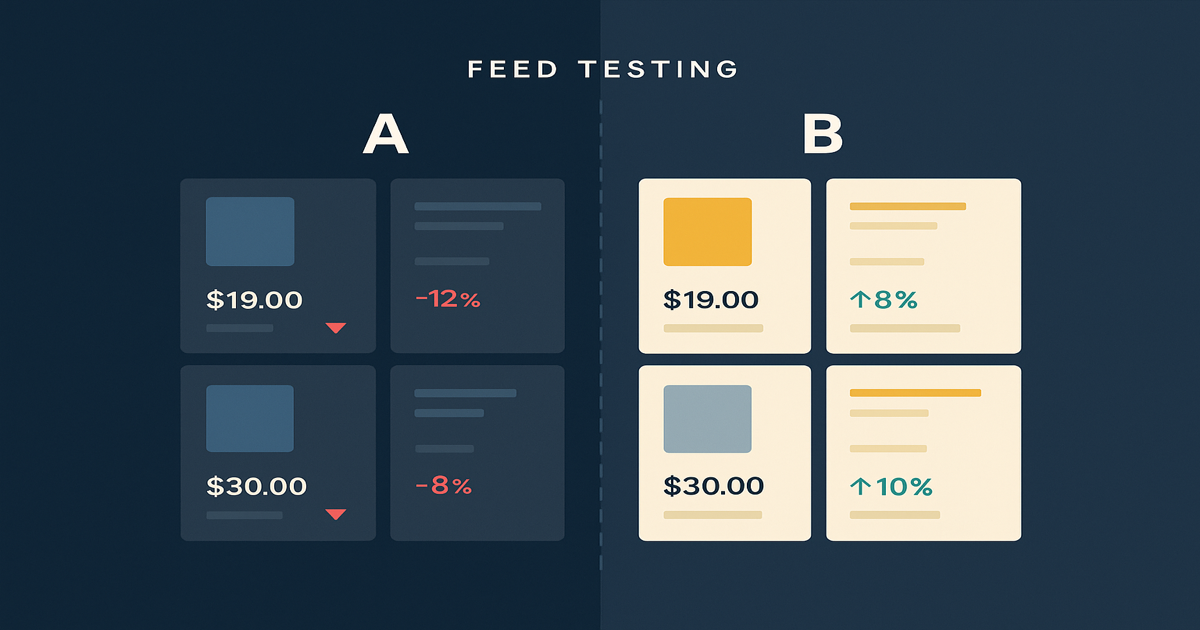
Your Shopify Product Feed Is a Testing Platform — Here's How to Use It
Most merchants treat their feed as a sync task. Here's how google shopping feed optimization with feed rules generates real marketing signal — and what to do with it.
The Best Feedonomics Alternative for Shopify Merchants (Honest Comparison)
Looking for a Feedonomics alternative built for Shopify? Compare features, pricing, and find the right product feed management tool for your store.