How to Optimize Google Shopping Product Titles (Shopify Guide)
How to Optimize Google Shopping Product Titles (Shopify Guide)
Google Shopping product title optimization is the highest-leverage change a Shopify merchant can make to their feed — and it’s the one most get wrong. Your Shopify product titles are written for browsers: people already on your site, already warm, already interested in what you sell. Google Shopping titles need to do something completely different. They have to win a relevance auction before your product even appears in a search result.
Every day your titles are formatted for browsing instead of Google’s intent-matching engine, you’re bleeding impression share to competitors whose feeds speak Google’s language. Their products surface on the exact queries yours should own. This guide gives you the formula, the Shopify field mapping, the common mistakes, and a way to fix your entire catalog with a single feed rule — without touching a single product in your Shopify admin.
1. Why Product Titles Are Your #1 Feed Lever
When Google decides which Shopping ads to show for a query, the product title is the primary matching signal. Not your campaign keywords. Not your bid strategy. Your title.
Unlike search campaigns, where you write keywords directly into ad groups and match types, Shopping campaigns match against feed attributes. Google reads your title, interprets what the product is, and decides whether it’s relevant to what a buyer just searched. A weak or generic title means:
- Missed impressions on high-intent queries that should trigger your product
- Broad matching on irrelevant queries that burn budget with no conversion intent
- Weaker Smart Bidding performance — your bidding algorithm has less signal to learn from
- Lower effective ad quality — Google’s auction rewards relevance; mismatched titles cost you in CPCs even when you do appear
The good news: title quality is entirely within your control, and improvements take effect the next time your feed syncs. No campaign restructure required. No creative assets to produce. One feed rule, applied catalog-wide.
Google’s own data shows that optimizing product feed data — including titles — can improve click-through rate by 20–30% without changing bids. That’s not incremental. That’s your impression share back in your column instead of your competitor’s.
The reason titles outperform other feed improvements is simple: they’re the first thing Google reads, they’re human-readable for buyers scanning Shopping results, and they’re the field that most directly signals product identity to both the algorithm and the shopper. Fix titles first.
2. The Brand + Product Type + Key Attribute Formula
The most effective structure for Google Shopping product title optimization follows a consistent pattern that Google itself recommends in its feed specification guidance:
[Brand] + [Product Type] + [Key Attribute(s)]
This sequence is intentional. Google’s algorithm weights the beginning of a title more heavily — the first 70 characters appear in most Shopping placements before truncation. Lead with identity, then add specificity. Think of it as answering three questions in order: Who made this? What is it? What makes this particular variant the right one?
The Formula Across Shopify Verticals
| Vertical | Weak Title | Optimized Title | Formula Applied |
|---|---|---|---|
| Apparel | Blue Henley | Patagonia Long-Sleeve Henley — Men’s | Organic Cotton | Slim Fit | Navy | Size M | Brand + Type + Material + Cut + Color + Size |
| Home Goods | Candle Set | Voluspa Baltic Amber 3-Wick Candle Set — 18 oz | 100 hr Burn Time | Glass Jar | Brand + Scent + Type + Size + Feature |
| Electronics | Wireless Earbuds | Sony WF-1000XM5 Wireless Noise-Canceling Earbuds — Bluetooth 5.3 | 24hr Battery | Black | Brand + Model + Type + Key Spec + Color |
| Beauty | Face Serum | The Ordinary Niacinamide 10% + Zinc 1% Face Serum — 30ml | Pore-Minimizing | Brand + Ingredient + Type + Size + Benefit |
Four different verticals, four different attribute priorities — but the same underlying logic. Lead with the brand, name the product type explicitly, then add the attributes that buyers in your category actually search for.
Shopify Field Mapping
The components of a strong feed title already exist in your Shopify store. The problem is that they’re scattered across multiple fields, and your storefront title only uses one of them. Here’s where each title component lives:
| Title Component | Shopify Source Field | Notes |
|---|---|---|
| Brand | vendor | Often blank — fill this in for every product |
| Product Type | product_type | Often generic (“Tops”) — make it specific (“Crew-Neck T-Shirt”) |
| Color | option1_value (if option name = Color) | Must be a proper Shopify variant option |
| Size | option2_value (if option name = Size) | Same — make sure option names are consistent |
| Material / Key Feature | tags or metafield | Use tags for searchable attributes SPF can pull in rules |
| Model Number | sku or barcode | Essential for electronics; use SKU if clean |
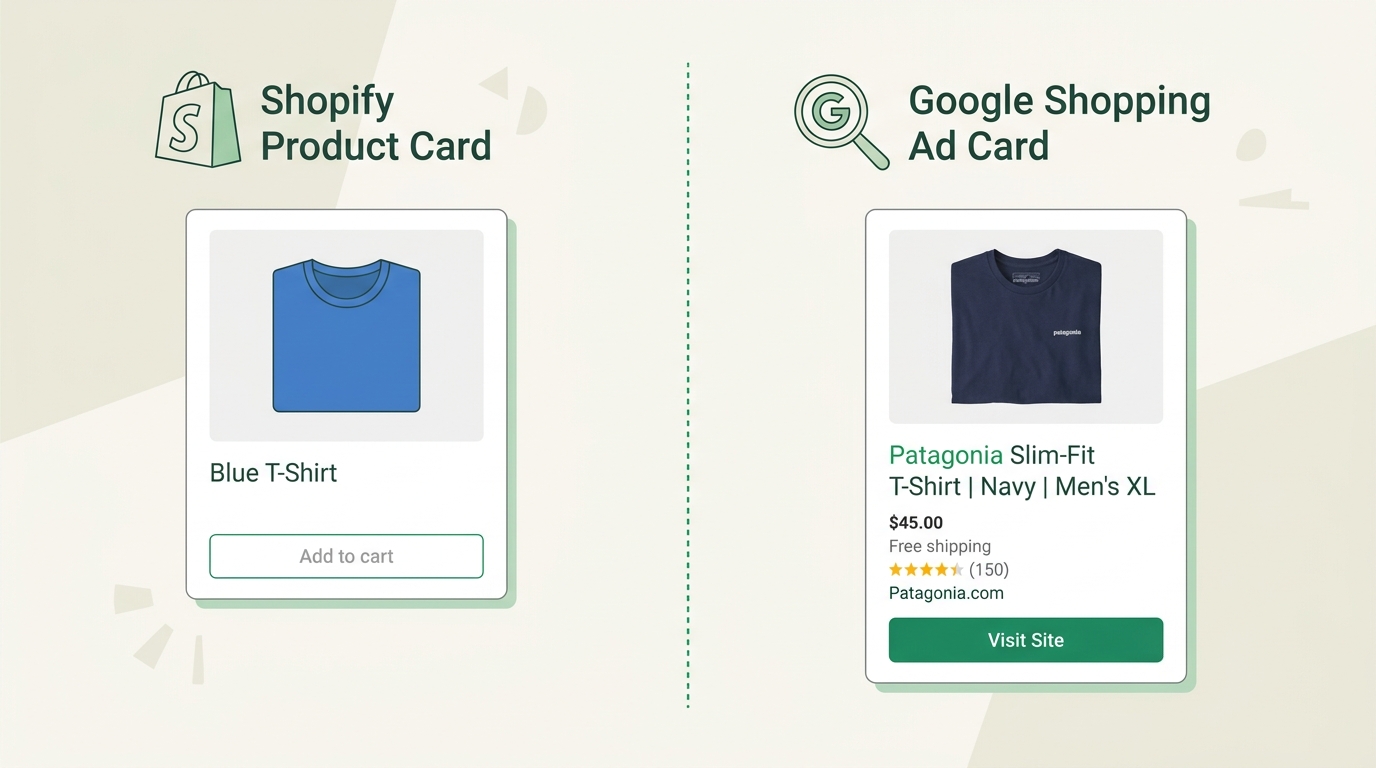
Your storefront title might be “Classic Tee” — clean, brand-appropriate, and perfect for your product page. Your feed title should be “Everlane Classic Crew-Neck Tee — Men’s | 100% Organic Cotton | Navy | Size L”. Same product. Same Shopify data. Different audience, different format, completely different performance.
Character budget: Google allows up to 150 characters. Target 70–130 — long enough to include meaningful attributes, short enough to avoid truncation risk. Anything beyond 70 characters may get cut in standard Shopping placement, so front-load the information that can’t be lost.
3. Common Title Mistakes and What Google Does With Them
Most Shopify merchants make the same title errors. The underlying cause is almost always the same: the title was written for the storefront, not the feed. Here’s what that looks like in practice — and what a fixed version delivers:
| Mistake | Bad Title | What Google Does | Optimized Version |
|---|---|---|---|
| Brand missing | Leather Wallet — Black | Competes broadly; brand queries go to competitors | Bellroy Slim Leather Wallet — Black | RFID Blocking | 8 Card Slots |
| Generic product type | Bag | Matches everything, converts nothing | Lo & Sons OMG 2 Weekender Bag — Women’s | 26L | Black | Carry-On Size |
| No variant attributes | Running Shoes | Every size and color gets the same title; no specificity signal | Brooks Ghost 16 Men’s Running Shoes — Neutral Cushion | Gray | Size 11 |
| Storefront copy | Our Best-Selling Cozy Blanket ✨ | Emojis and superlatives waste character budget; no match value | Bearaby Cotton Napper Weighted Blanket — 20 lb | Chunky Knit | Stone White |
| Wrong attribute order | Black Size 10 Women’s Nike Air Max | Color-first buries brand and model; identity signal truncated | Nike Air Max 270 Women’s Sneakers — Black | React Foam | Size 10 |
| Duplicate titles per variant | Shirt (×48 variants) | One generic title covers 48 SKUs; no variant-level signal | Uniqlo Supima Cotton Oxford Shirt — Men’s | Blue | Size M |
| Promotional language | SALE — Premium Yoga Pants — Free Shipping | Policy violation; often disapproved or filtered | Lululemon Align High-Rise Yoga Pants — Women’s | 25” Inseam | Black | Size 6 |
The core error in every bad title is the same: it was written for someone already looking at the product, not someone searching for it on Google. Fix the mental model and the titles follow naturally.
Store Title vs. Feed Title
Same product, two audiences, two titles.
Your Shopify title is a brand asset. Clean. Distinctive. It fits the nav. Returning customers recognize it. This is exactly what a store title should do.
5. Title Rules in SPF: One Rule, Entire Catalog Updated
Here’s the real problem with fixing titles: if you have 500 products and each has 6 variants, you’re looking at 3,000 individual title edits in Shopify — and you’d have to undo every one of them if your storefront ever needs different copy. That’s not an optimization strategy. That’s a maintenance trap.
Simple Product Feeds solves this with Custom Rules: a template engine that generates feed-optimized titles from your existing Shopify data fields, applied automatically to every product in your catalog, without modifying a single Shopify product.
How SPF Custom Rules Work
In your SPF dashboard, navigate to Feed Rules → Title. You’ll see a Custom Rule field that accepts template variable syntax using double curly braces. SPF pulls values directly from your Shopify product and variant fields and assembles the title at feed generation time.
Core template variables:
| Variable | Source |
|---|---|
{{vendor}} | Shopify product vendor |
{{title}} | Shopify product title |
{{product_type}} | Shopify product type |
{{option1_value}} | First variant option value (e.g., Navy, Black) |
{{option2_value}} | Second variant option value (e.g., Size M, 30ml) |
{{option1_name}} | Option label (e.g., “Color”, “Size”) |
{{sku}} | Variant SKU |
{{tags}} | Comma-separated product tags |
Example rule for an apparel store:
{{vendor}} {{title}} — {{option1_value}} | {{option2_value}}Applied to a Patagonia product where title = "Nano Puff Jacket", option1 = Black, option2 = M, this outputs:
Patagonia Nano Puff Jacket — Black | MTo add the option label for clarity:
{{vendor}} {{title}} — {{option1_name}}: {{option1_value}} | {{option2_name}}: {{option2_value}}Output: Patagonia Nano Puff Jacket — Color: Black | Size: M
Rule Patterns by Store Type
| Store Type | SPF Rule Template | Output Example |
|---|---|---|
| Apparel | {{vendor}} {{title}} — {{option1_value}} | {{option2_value}} | Everlane Crew Tee — Navy | Size M |
| Electronics | {{vendor}} {{title}} {{sku}} — {{option1_value}} | Sony WF-1000XM5 WF1000XM5/B — Black |
| Home goods | {{vendor}} {{product_type}} {{title}} — {{option1_value}} | Voluspa Candle Baltic Amber — 18oz |
| Beauty | {{vendor}} {{title}} {{option1_value}} — {{product_type}} | The Ordinary Niacinamide 10% 30ml — Face Serum |
What This Means in Practice
Write the rule once → it applies to every product in your catalog on the next feed sync. No manual edits.
Your Shopify titles don’t change → storefront and feed are fully decoupled. Your customers still see your brand-formatted copy on product pages. Your feed has Google-optimized titles.
Variant-level precision → each variant gets its own distinct title. Every color and size combination surfaces correctly in queries — no generic one-title-fits-all coverage.
Rule updates are instant → edit the rule template in SPF and every title in your feed updates on the next sync cycle. No bulk imports, no CSV gymnastics.
This is why title rules are the first configuration step we recommend when you onboard with SPF. A few hours of rule-writing can reshape the entire intent-matching surface of your catalog. If you want a deeper look at every feed attribute SPF can optimize, the product feed management guide covers the full field set.
6. The AI Max Era: Why Titles Matter Even More With Intent-Matching
If you’re running AI Max for Shopping campaigns — or planning to — Google Shopping product title optimization just became significantly more important.
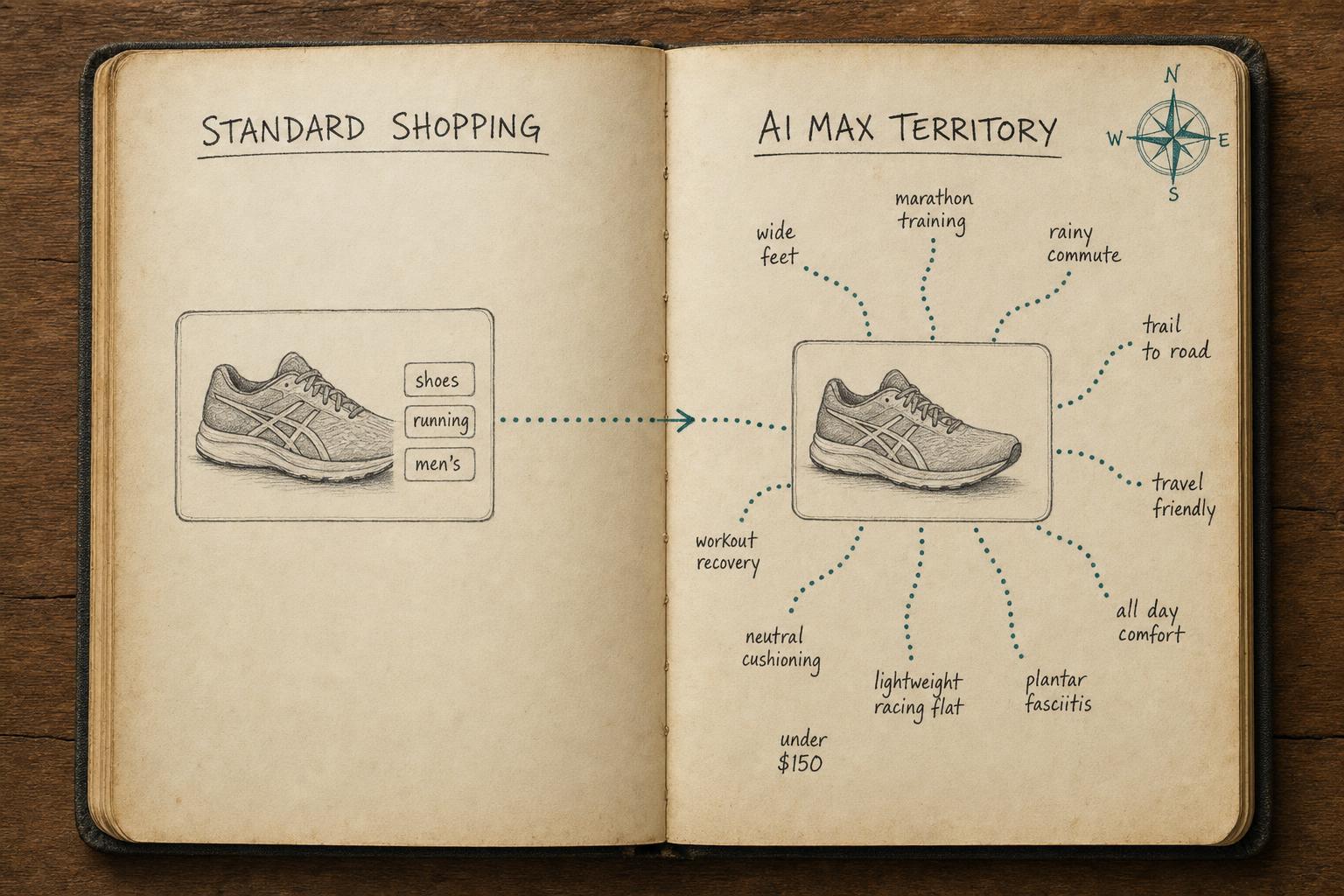
Standard Shopping operated like a structured keyword match system: Google parsed your title for relevant terms, matched against query strings, and surfaced your product if the overlap was sufficient. The matching logic was relatively mechanical. A weak title cost you coverage. A strong title bought you precise coverage. The delta was meaningful but bounded.
AI Max changes the rules entirely.
AI Max doesn’t just match your title to queries — it interprets intent from your title and uses it to assemble ad creatives, expand to semantically related queries, and determine which buyers across the web are relevant to your product. Google has confirmed that feed data — especially titles and descriptions — is the primary training signal AI Max uses to understand what your products are and who should see them.
In practice, this means:
Structured titles give AI Max exponentially more signal. Patagonia Nano Puff Jacket — Insulated | Women's | Black | S tells the model: brand identity, product category, functional attribute, target audience, color, size. Each attribute is a dimension the AI can use to match intent. The more structured your title, the more precisely the AI can target.
Generic titles create compounding ambiguity. Women's Jacket gives AI Max almost nothing. It could be outerwear, a blazer, an athletic shell, formalwear, or a rain jacket. The AI will match broadly — and broadly is expensive when “broadly” means thousands of irrelevant impressions.
AI Max draws from your titles more aggressively than Standard Shopping did. In Standard Shopping, a slightly imprecise title might cost you coverage on specific queries. In AI Max, that same imprecision gets amplified across the AI’s broader matching surface. It uses title attributes to generate responsive headlines, evaluate query relevance at scale, and assess product-audience fit. Weak input, weak output — and the weak output is now running across a much larger query space.
The compounding effect goes both directions. Strong, attribute-rich titles in AI Max mean the AI can match precisely and expand intelligently to related high-intent queries you might not have thought to target. It’s not just about coverage — it’s about giving the AI a foundation to find opportunities.
If you were getting away with generic titles under Standard Shopping, AI Max will surface those weaknesses faster and make them more expensive. The merchants who’ve already cleaned up their title structure will compound that advantage as AI Max scales.
For the complete list of feed attributes that affect AI Max performance — including GTINs, product type taxonomy, and description quality — see our AI Max for Shopping checklist.
7. Title Optimization Checklist + Next Steps
Run through this checklist before you consider your title work done. It covers every layer: structure, Shopify data quality, your SPF rule, and post-launch tracking.
Structure
- Title starts with Brand name (or model number for branded electronics)
- Product type is explicit and specific — “weekender bag” not “bag”; “crew-neck tee” not “shirt”
- At least 2–3 key attributes included: color, size, material, model number, or primary feature
- Title is 70–130 characters (check your feed export — not your Shopify title)
- No promotional language: no “best-selling,” “free shipping,” “SALE,” or emoji
- First 70 characters contain brand + product type (everything past that may truncate)
Shopify Data Quality
-
vendorfield populated for all products (this is the brand in your SPF rule) -
product_typeis set and specific — not blank, not “Default Title” - Variant options have consistent, descriptive names: “Color” not “Option 1”, “Size” not “Option 2”
- Color and material values are clean — no abbreviations buyers won’t search for
- Key features not captured in standard Shopify fields are added as tags or metafields
SPF Rule
- Custom title rule is written and saved in SPF Feed Rules → Title
- Rule output reviewed for at least 10 products across different product types
- Each variant produces a distinct, attribute-specific title (not one title per product)
- Output falls within 70–130 characters for representative SKUs
Post-Optimization
- Feed synced and accepted in Google Merchant Center (no new disapprovals)
- Products → Diagnostics checked for title policy violations
- Impression share, CTR, and search query report monitored over 14 days post-change
- Notable title patterns flagged for iteration (what queries are you now showing on? What’s still missing?)
Start Optimizing Your Titles Today
Google Shopping product title optimization doesn’t require a campaign overhaul, a content team, or 3,000 manual edits. It requires the right formula applied consistently across your catalog — and a tool that handles the field assembly automatically.
Simple Product Feeds gives you the Custom Rules engine, the Shopify field mapping, and the feed sync infrastructure to make this change in an afternoon. Your storefront stays exactly as it is. Your Google feed starts speaking the language Google’s algorithm actually matches — and the language your buyers actually search.
Install Simple Product Feeds on Shopify — free plan, no time limit
Ready to go deeper on your feed? The product feed optimization guide covers every major feed attribute — images, GTINs, pricing, availability, product type — and how each one affects your Shopping performance from first impression to purchase.
Ready to simplify your product feeds?
Simple Product Feeds connects your Shopify store to Google Shopping, Meta, and more — in minutes.
Install Simple Product FeedsFrequently Asked Questions
- What is the best format for Google Shopping product titles?
- The most effective format is Brand + Product Type + Key Attribute(s). For example: 'Patagonia Nano Puff Jacket — Men's | Insulated | Black | Size M'. This structure puts the most important identity signals first, matches how buyers search, and gives Google's algorithm the structured detail it needs to match your product to high-intent queries.
- How long should Google Shopping product titles be?
- Google allows up to 150 characters. Aim for 70–130 characters to fit within visible display limits while including your key attributes. The first 70 characters matter most — Google truncates titles in Shopping listings, so front-load the brand and primary product type before adding modifiers.
- Should I include color and size in Google Shopping product titles?
- Yes, when they are search-relevant attributes. For apparel, footwear, and home goods, color and size in the title improve query matching and reduce irrelevant impressions. For electronics or branded goods where searchers don't typically include those modifiers, focus on model number and key features instead. The rule: include attributes that appear in real buyer searches for that product type.
- Can I update product titles without editing every product in Shopify?
- Yes, with Simple Product Feeds. SPF's Custom Rules let you write a single title template — like '{{vendor}} {{title}} — {{option1_value}}' — that applies across your entire catalog. You keep your Shopify titles exactly as they are (formatted for your storefront) and SPF generates a separate, Google-optimized feed title from the same data.
- Does product title optimization work differently for AI Max for Shopping?
- Yes. AI Max uses your titles more aggressively than Standard Shopping campaigns. Standard Shopping matched titles to explicit search queries. AI Max interprets buyer intent and assembles ad creative — your title is the primary input for product identity. Structured, attribute-rich titles give the AI more to work with; generic titles lead to broader, less relevant query matching and wasted spend.
Related Articles
How to Optimize Your Shopify Product Feed (Complete Guide)
Optimize your Shopify product feed for Google Shopping with this step-by-step guide. Fix titles, categories, GTINs, and feed rules to get more impressions and clicks.
Is Your Shopify Feed Ready for AI Max for Shopping?
Is your Shopify feed ready for AI Max for Shopping? Run this pre-launch checklist before you enable it — or risk wasting budget on weak signals.
The Complete Guide to Product Feed Management for Shopify
Product feed management is more than syncing your catalog. Here's the complete guide to how it works, what breaks, and how Shopify merchants do it right.