How to Connect Your Shopify Store to Commission Junction
If you’re running an affiliate program on Commission Junction and your product catalog isn’t current, your publishers are working blind.
They’re showing stale prices. Linking to products that are out of stock. Or not promoting you at all because they don’t have clean product data to work with. That’s not a publisher problem — it’s a feed problem. And it costs you affiliate revenue every day it goes unfixed.
Most Shopify merchants on CJ handle this manually: exporting CSVs, reformatting columns, uploading files to an SFTP server, then repeating the whole process when products change. Some skip the feed entirely. Neither option gives your affiliate channel what it needs.
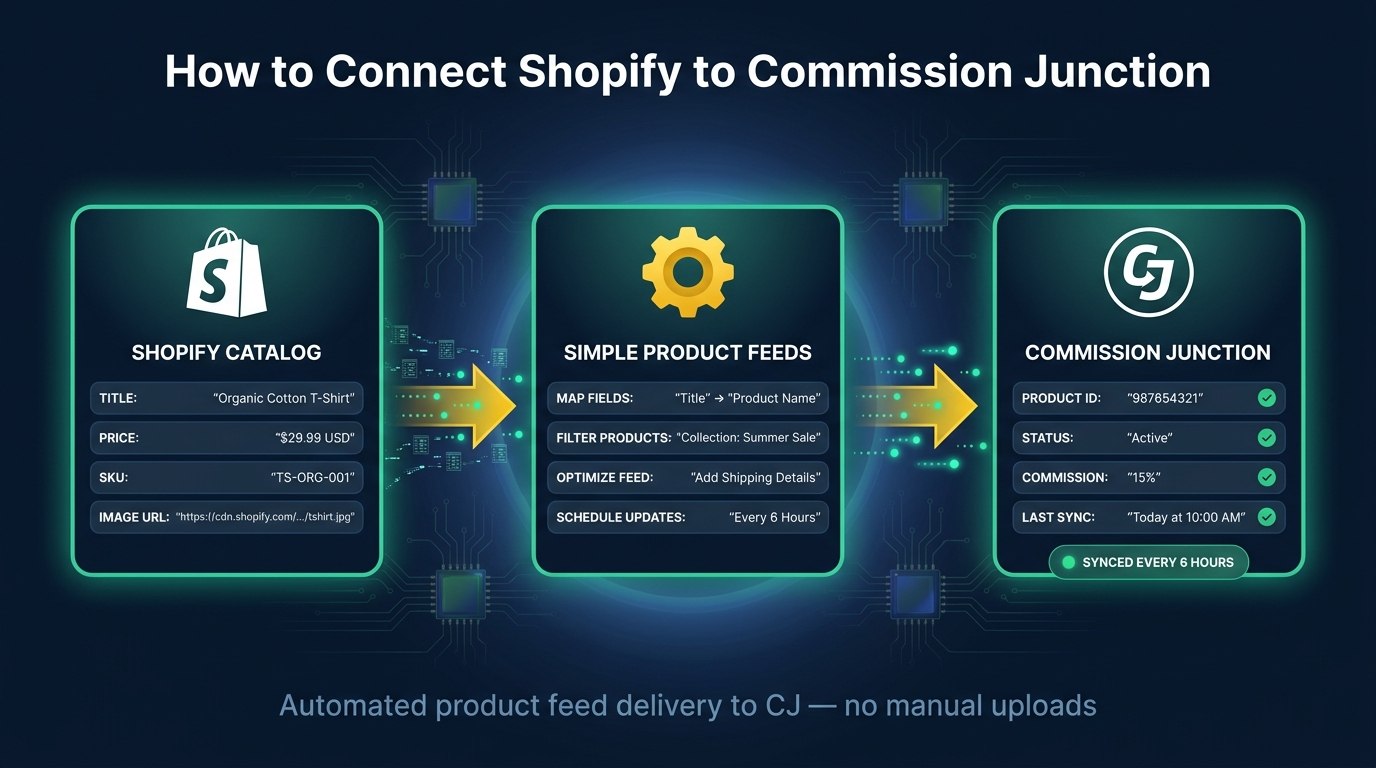
Simple Product Feeds connects your Shopify store to Commission Junction and delivers your product feed automatically — formatted, current, and pushed to CJ every 6 hours without you touching it.
How Commission Junction’s product feed system works
Commission Junction requires advertisers to deliver a product catalog before publishers can use it. That catalog is your inventory: product titles, prices, images, availability, and links back to your store. Publishers use it to build product links, shopping widgets, and promotional content that drives buyers to you.
CJ supports several delivery methods. Simple Product Feeds uses SFTP push — your feed is delivered directly to CJ’s server on a schedule. No URLs to configure on CJ’s side, no manual uploads. We push; they receive.
The format CJ expects is Google Shopping format — the same product feed specification that powers Google Shopping campaigns. If your products are running on Google Shopping, the feed structure is already familiar. CJ’s ingestion handles it natively, and SPF delivers it automatically.
When CJ has your current catalog, publishers can:
- Build dynamic product widgets with live prices and availability
- Filter for in-stock products, so traffic they send actually converts
- Target promotions to the specific SKUs or categories you want featured
When the catalog is stale or missing, publishers can’t do any of this. They work with old data or deprioritize your products entirely.
From manual CSV to automatic feed
How CJ delivery has changed — and where it lands today
The way most merchants started
- Export products to CSV
- Map columns by hand
- Clean & fix formatting
- Upload to the CJ portal
- Remember to repeat
The original CJ workflow. Every column mapped by hand, every refresh a manual export and upload. Miss a week and publishers are building links against last month’s prices.
What Simple Product Feeds does for your CJ integration
SPF closes the gap that CJ’s native tooling leaves open. It connects directly to your Shopify store, keeps your product data current, formats it in the Google Shopping spec CJ expects, and pushes the file to CJ via SFTP on a fixed schedule.
Your feed stays current without manual work. When you update a price, mark a product out of stock, or add a new variant in Shopify, that change flows into the next scheduled sync. Publishers always have accurate data — not a snapshot from the last time someone remembered to export a CSV.
No format translation required. CJ accepts Google Shopping format natively. SPF delivers that format directly, so there’s no separate column mapping to configure and no proprietary CJ format to learn. The same feed structure driving your Google Shopping campaigns goes straight to your CJ affiliate program.
Multiple programs, one setup. If you run more than one CJ affiliate program — separate programs for different product lines or markets — each can have its own feed with its own filename, delivered to CJ on the same 6-hour schedule.
Feed quality validation before CJ sees it. Before every push, SPF runs your feed through a CJ-specific validator. If something is going to get flagged — a missing required field, a price inconsistency, a formatting issue — you see it in the app before it becomes a CJ rejection. You fix it at the source, not after the fact.
Step-by-step setup
Getting your Shopify catalog into Commission Junction takes about ten minutes. After that, it runs automatically.
Before you start: Log into your CJ advertiser account and set up a new product feed record. Navigate to Account → Product Feeds → Add Feed and fill in the registration form:
- Delivery Method: CJ SFTP (Post)
- Data Format: Pipe
- Format: Shopping (Google Format)
- File Name: Choose a name with an extension — for example,
yourstore-products.csv. Write this down exactly; you’ll need to match it character-for-character in SPF.
Save the form. CJ will email you SFTP credentials (host, port, username, password) within a few minutes.
Then connect in SPF:
-
Install Simple Product Feeds from the Shopify App Store. The free plan covers up to 50 products — no credit card required.
-
Open Channels in the side nav and click Connect on the Commission Junction tile.
-
Enter your CJ SFTP credentials — host, port, username, and the password from CJ’s email. Click Connect.
-
Configure your feed. After connecting, click Configure on the feed row that auto-appears. Enter:
- Filename: exactly what you chose in CJ’s form, including the extension, case-sensitive
- Delimiter: Pipe (to match what you selected in CJ’s form)
- Program Name: your CJ advertiser program name as it appears in CJ’s admin
-
Click Sync now. Your first feed pushes immediately. After that, syncs run every 6 hours automatically.
To verify: check the Sync logs tab in SPF for a green Success badge, then check CJ’s admin under your feed record for a “Last received” timestamp. CJ can take up to a few hours to process a new feed on first receipt.
One common gotcha: The filename is case-sensitive and must match exactly between CJ’s form and SPF’s config.
Shopifyfeed.csvandshopifyfeed.csvare different files to CJ. A mismatch is the most common reason a sync shows success but CJ shows no data.
What this means for your affiliate revenue
Publishers perform better when they have accurate product data. Most merchants underestimate how much a stale or missing feed costs them.
When a publisher builds an affiliate widget or a product comparison page, they’re pulling from your catalog. If the catalog shows an old price, the publisher shows an old price. If a product is out of stock but still listed as available, the publisher sends traffic to a dead end. If your catalog hasn’t been updated in two weeks, publishers with smart filtering are deprioritizing your products because out-of-date catalogs signal low quality.
An automated, current feed changes that:
- Publishers can build product widgets with live prices and real availability
- They can filter for in-stock products only, so affiliate traffic converts instead of bouncing
- They can target promotions to the specific SKUs or categories you want featured
- Their affiliate software has the clean data it needs to match buyers with the right products
One New York retailer running affiliate programs on Commission Junction was managing their product catalog manually before automating with Simple Product Feeds. With hundreds of products and prices that changed regularly, keeping the feed current was a recurring operations task. Automating feed delivery meant publishers always had current data — and the affiliate channel became more consistent as a result.
The affiliate channel rewards advertisers who make publishers’ lives easy. A clean, current, automatically updated product feed is the baseline. It’s not a growth tactic — it’s table stakes for getting real performance out of a CJ program.
Connect your Shopify store to Commission Junction
If you’re running an affiliate program on CJ and your product feed isn’t automated, that’s the first thing to fix. Everything downstream — publisher performance, commission volume, affiliate revenue — depends on publishers having accurate product data.
Simple Product Feeds handles the connection. Configure it once, and your feed delivers to CJ on schedule, automatically.
Install Simple Product Feeds on the Shopify App Store →The free plan includes up to 50 products and covers the full Commission Junction integration — no credit card required. Paid plans start at $9.99/month for larger catalogs.
For broader context on how product feed delivery works across channels, the product feed management guide covers the full lifecycle — useful background if you’re managing feeds for Google Shopping, Meta, and affiliate channels at the same time.
Ready to simplify your product feeds?
Simple Product Feeds connects your Shopify store to Google Shopping, Meta, and more — in minutes.
Install Simple Product FeedsFrequently Asked Questions
- Does Commission Junction integrate directly with Shopify?
- No. Commission Junction has no native Shopify app or direct connector. Merchants have to deliver a product feed to CJ via SFTP, URL pull, or CJ's REST API. Simple Product Feeds automates the SFTP delivery — it connects to your Shopify store, formats the feed, and pushes it to CJ on a 6-hour schedule without any manual work.
- What product feed format does Commission Junction accept?
- Commission Junction accepts two formats: their proprietary CJ Standard format and the Google Shopping (Google Format) spec. Simple Product Feeds delivers your feed in Google Shopping format — the same structured data your Google Shopping campaigns already run on. CJ's ingestion handles the format natively.
- How often does Simple Product Feeds sync to Commission Junction?
- Simple Product Feeds pushes your feed to Commission Junction every 6 hours automatically. You can also trigger a manual sync at any time from the Channels page.
- Do I need a paid plan to use the Commission Junction integration?
- The free plan includes up to 50 products and covers the full Commission Junction integration. Paid plans start at $9.99/month for up to 3,000 products if your catalog is larger.
Related Articles
The Best Feedonomics Alternative for Shopify Merchants (Honest Comparison)
Looking for a Feedonomics alternative built for Shopify? Compare features, pricing, and find the right product feed management tool for your store.
The Complete Guide to Product Feed Management for Shopify
Product feed management is more than syncing your catalog. Here's the complete guide to how it works, what breaks, and how Shopify merchants do it right.